> ## Documentation Index
> Fetch the complete documentation index at: https://docs.cnap.tech/llms.txt
> Use this file to discover all available pages before exploring further.
# Products Infrastructure
> Understand how products enable you to sell and deploy software to customers
 Products are sellable software packages you create in CNAP. They combine your application's deployment configuration with pricing to enable customers to purchase and deploy your software through the marketplace or direct links.
When you create a product, CNAP automatically creates a template from your Helm sources, generates a versioned package, and makes it available for deployment. Products with Stripe pricing automatically appear in the marketplace.
## How Products Work
Products package your software for sale. Each product includes:
* **Deployment configuration** — Helm charts and sources that define how your software runs
* **Pricing** — optional Stripe integration for customer billing
* **Cluster targeting** — which clusters the product can be deployed to
* **Display settings** — custom images, descriptions, and visibility options
When customers purchase your product, CNAP automatically deploys it to the selected cluster after payment. Each customer gets their own isolated installation with dedicated resources.
## Products and Templates
Products are powered by templates, which store your Helm source configurations. When you create a product:
1. A template is automatically created from your Helm sources
2. The template generates a versioned package (e.g., `0.1.0`)
3. The product references the template and adds pricing configuration
4. Updates to the product's sources update the underlying template
One template can power multiple products, or be deployed directly without pricing as a standalone install. Learn more about [templates →](/products/templates)
## When to Use Products
Use products when you want to sell software to customers:
* **Open source monetization** — offer managed, dedicated deployments of your OSS project (databases, dev tools, analytics, CMS, etc.) as a cloud service without building multi-tenant infrastructure
* **SaaS with dedicated instances** — enterprise customers who need isolation get their own deployment (healthcare, finance, collaboration tools)
* **Managed database services** — offer dedicated database clusters (PostgreSQL, Redis, ClickHouse, etc.) per customer
* **Custom applications** — B2B SaaS, industry-specific software, white-label solutions, or internal tools turned into products
Products with Stripe pricing automatically appear in the marketplace, making them discoverable to all CNAP users. You can also sell products directly by linking to the product's deployment page from your own website.
## Products vs. Direct Installs
| | Products | Direct Installs |
| --------------- | --------------------------------- | -------------------------------------------- |
| **Purpose** | Sell software to customers | Internal tools, shared databases, monitoring |
| **Pricing** | Optional Stripe integration | No pricing |
| **Marketplace** | Listed when pricing is configured | Not listed |
| **Template** | Auto-created from Helm sources | Auto-created from Helm sources |
Both use templates automatically created from your Helm sources. Learn more about [application deployments →](/deployments)
## Related
Understand how templates power products
Learn how products appear in the marketplace
See how products create customer installations
Understand how Stripe integration works
### Creating a Product
Onboard your product through the [Products Dashboard](https://cnap.tech/products?create=product).
Products are sellable software packages you create in CNAP. They combine your application's deployment configuration with pricing to enable customers to purchase and deploy your software through the marketplace or direct links.
When you create a product, CNAP automatically creates a template from your Helm sources, generates a versioned package, and makes it available for deployment. Products with Stripe pricing automatically appear in the marketplace.
## How Products Work
Products package your software for sale. Each product includes:
* **Deployment configuration** — Helm charts and sources that define how your software runs
* **Pricing** — optional Stripe integration for customer billing
* **Cluster targeting** — which clusters the product can be deployed to
* **Display settings** — custom images, descriptions, and visibility options
When customers purchase your product, CNAP automatically deploys it to the selected cluster after payment. Each customer gets their own isolated installation with dedicated resources.
## Products and Templates
Products are powered by templates, which store your Helm source configurations. When you create a product:
1. A template is automatically created from your Helm sources
2. The template generates a versioned package (e.g., `0.1.0`)
3. The product references the template and adds pricing configuration
4. Updates to the product's sources update the underlying template
One template can power multiple products, or be deployed directly without pricing as a standalone install. Learn more about [templates →](/products/templates)
## When to Use Products
Use products when you want to sell software to customers:
* **Open source monetization** — offer managed, dedicated deployments of your OSS project (databases, dev tools, analytics, CMS, etc.) as a cloud service without building multi-tenant infrastructure
* **SaaS with dedicated instances** — enterprise customers who need isolation get their own deployment (healthcare, finance, collaboration tools)
* **Managed database services** — offer dedicated database clusters (PostgreSQL, Redis, ClickHouse, etc.) per customer
* **Custom applications** — B2B SaaS, industry-specific software, white-label solutions, or internal tools turned into products
Products with Stripe pricing automatically appear in the marketplace, making them discoverable to all CNAP users. You can also sell products directly by linking to the product's deployment page from your own website.
## Products vs. Direct Installs
| | Products | Direct Installs |
| --------------- | --------------------------------- | -------------------------------------------- |
| **Purpose** | Sell software to customers | Internal tools, shared databases, monitoring |
| **Pricing** | Optional Stripe integration | No pricing |
| **Marketplace** | Listed when pricing is configured | Not listed |
| **Template** | Auto-created from Helm sources | Auto-created from Helm sources |
Both use templates automatically created from your Helm sources. Learn more about [application deployments →](/deployments)
## Related
Understand how templates power products
Learn how products appear in the marketplace
See how products create customer installations
Understand how Stripe integration works
### Creating a Product
Onboard your product through the [Products Dashboard](https://cnap.tech/products?create=product).
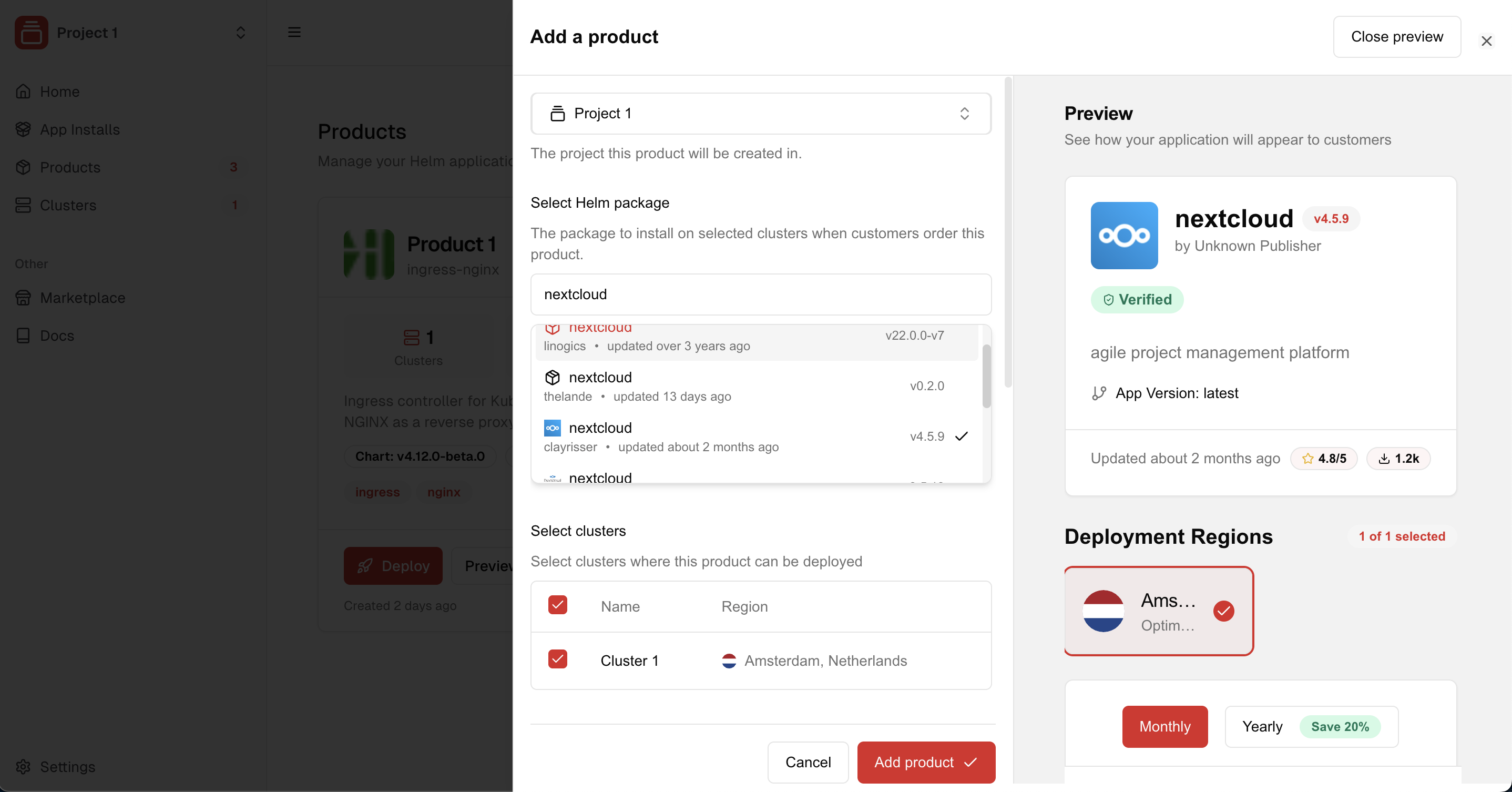 You can select the Helm package from Artifact Hub.
Our roadmap includes support for Helm charts hosted on private Git/OCI
repositories in the near future.
Select to which clusters the product can be deployed. Users
will only see the regions of the clusters when they are deploying the product.
Checkout [Clusters](/clusters) for more information.
### Pricing products
If you require users to pay for deployments of a product, you can link a CNAP product with one or more Stripe prices from one or more Stripe products.
Make sure to connect with Stripe in the [Settings](https://cnap.tech/payments) of your workspace to onboard with a Stripe account connected to CNAP.
You can select the Helm package from Artifact Hub.
Our roadmap includes support for Helm charts hosted on private Git/OCI
repositories in the near future.
Select to which clusters the product can be deployed. Users
will only see the regions of the clusters when they are deploying the product.
Checkout [Clusters](/clusters) for more information.
### Pricing products
If you require users to pay for deployments of a product, you can link a CNAP product with one or more Stripe prices from one or more Stripe products.
Make sure to connect with Stripe in the [Settings](https://cnap.tech/payments) of your workspace to onboard with a Stripe account connected to CNAP.
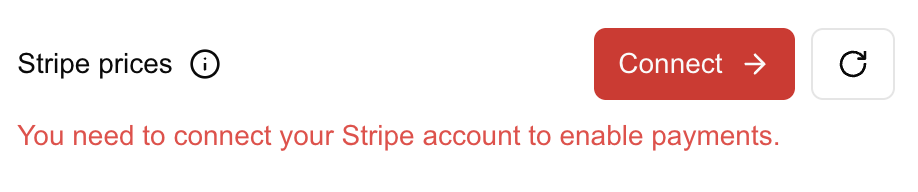 Once Stripe is connected, you can associate Stripe prices with the CNAP product.
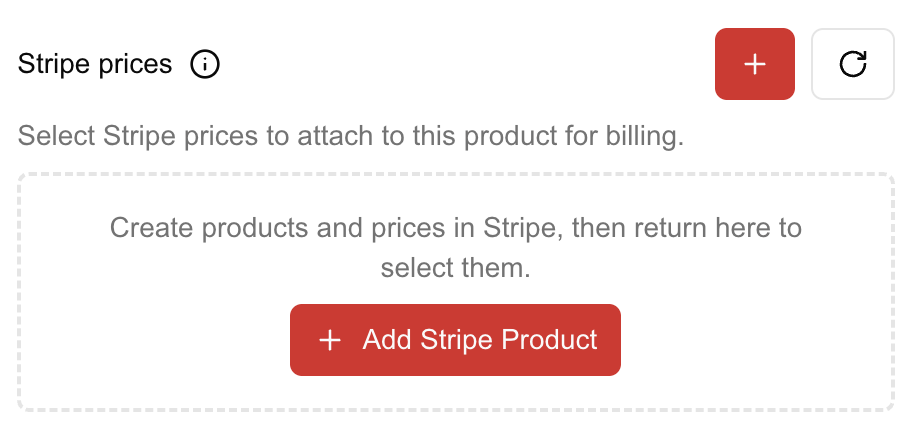 Create a **Stripe product with prices** in the Stripe dashboard.
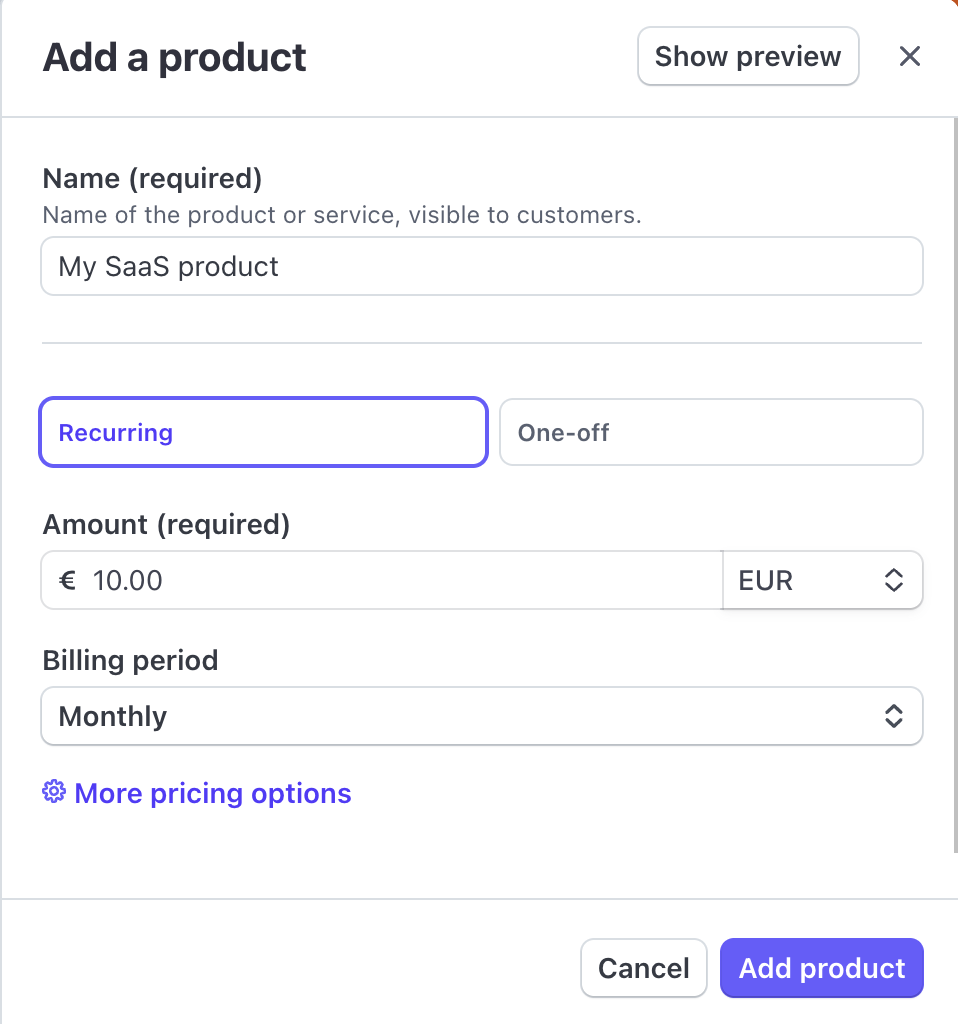 You can edit the Stripe product to add even more prices, e.g.:
* €10/month subscription
* €50 one-time setup fee
You can edit the Stripe product to add even more prices, e.g.:
* €10/month subscription
* €50 one-time setup fee
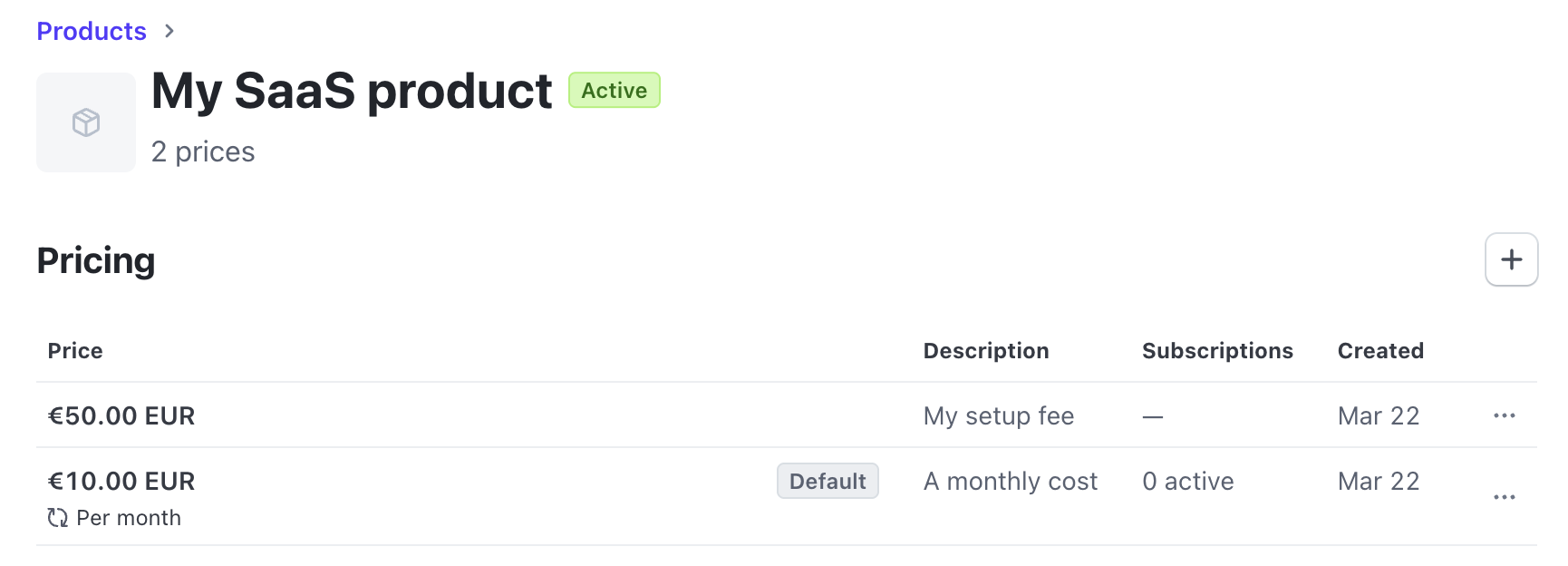 As soon as the Stripe products and prices are created, they will be immediately loaded and available for selection in CNAP.
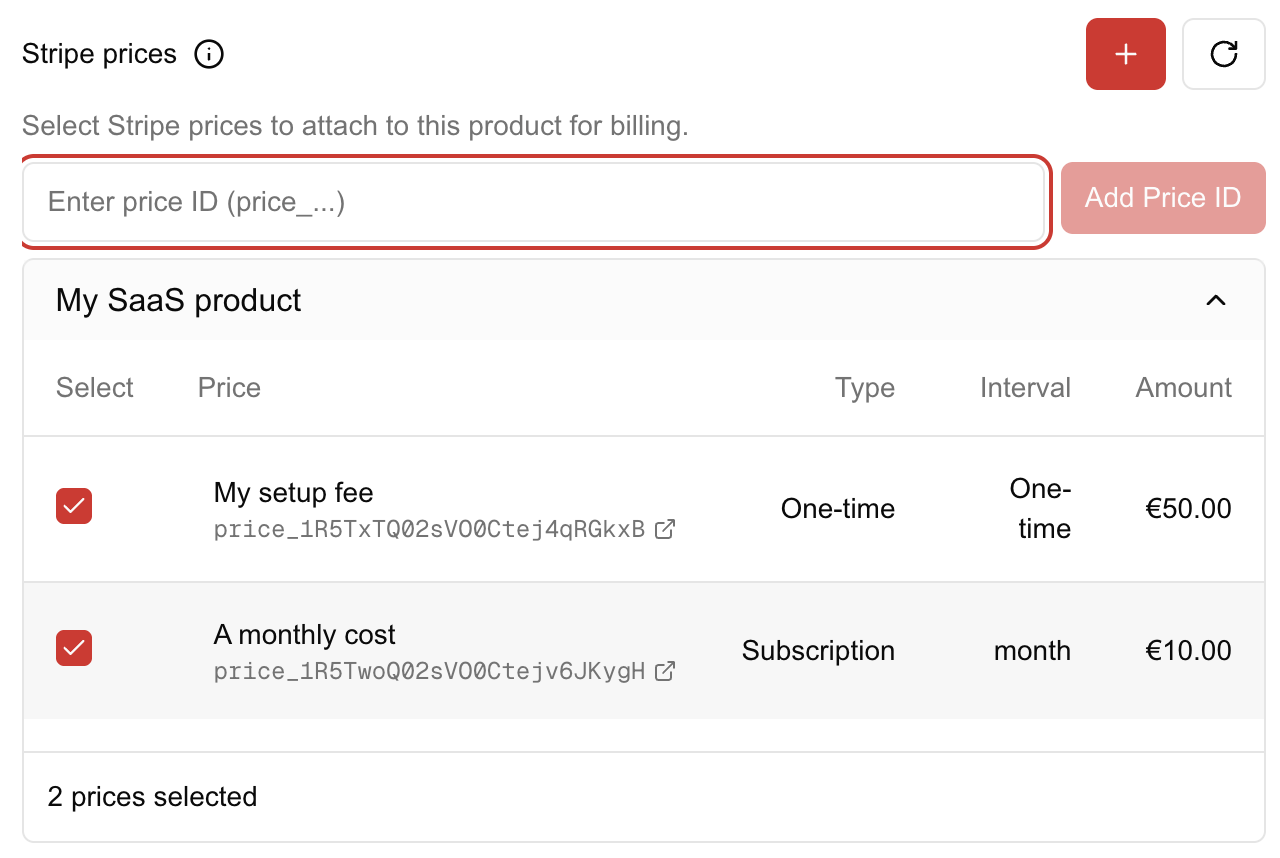 All prices you select for the CNAP product will apply when users checkout the product in the marketplace.
You can also create more Stripe products and select their prices for the same CNAP product if you need to
(e.g. a deployment consists of multiple services).
Click "Add Product" to create the product.
***
Congrats! You're set up to start your hosting, and it's batteries included!
Need support or want to give some feedback? You can join our
[Discord-Community](https://discord.gg/gNh9bUWVp7) or drop us an email at
[support@cnap.tech](mailto:support@cnap.tech).
All prices you select for the CNAP product will apply when users checkout the product in the marketplace.
You can also create more Stripe products and select their prices for the same CNAP product if you need to
(e.g. a deployment consists of multiple services).
Click "Add Product" to create the product.
***
Congrats! You're set up to start your hosting, and it's batteries included!
Need support or want to give some feedback? You can join our
[Discord-Community](https://discord.gg/gNh9bUWVp7) or drop us an email at
[support@cnap.tech](mailto:support@cnap.tech).